
Automated Backlink Publishing with Live Verification
Publish backlinks on verified resources, see which ones go live, and skip the manual guesswork.
Verified first
Only tested submit-ready resources
Auto-submit logs
Status codes and failure reasons
Live tracking
Recheck published pages for links
No ranking guarantees and no spam blasts. Failed, removed, or not-live tasks automatically return credits.
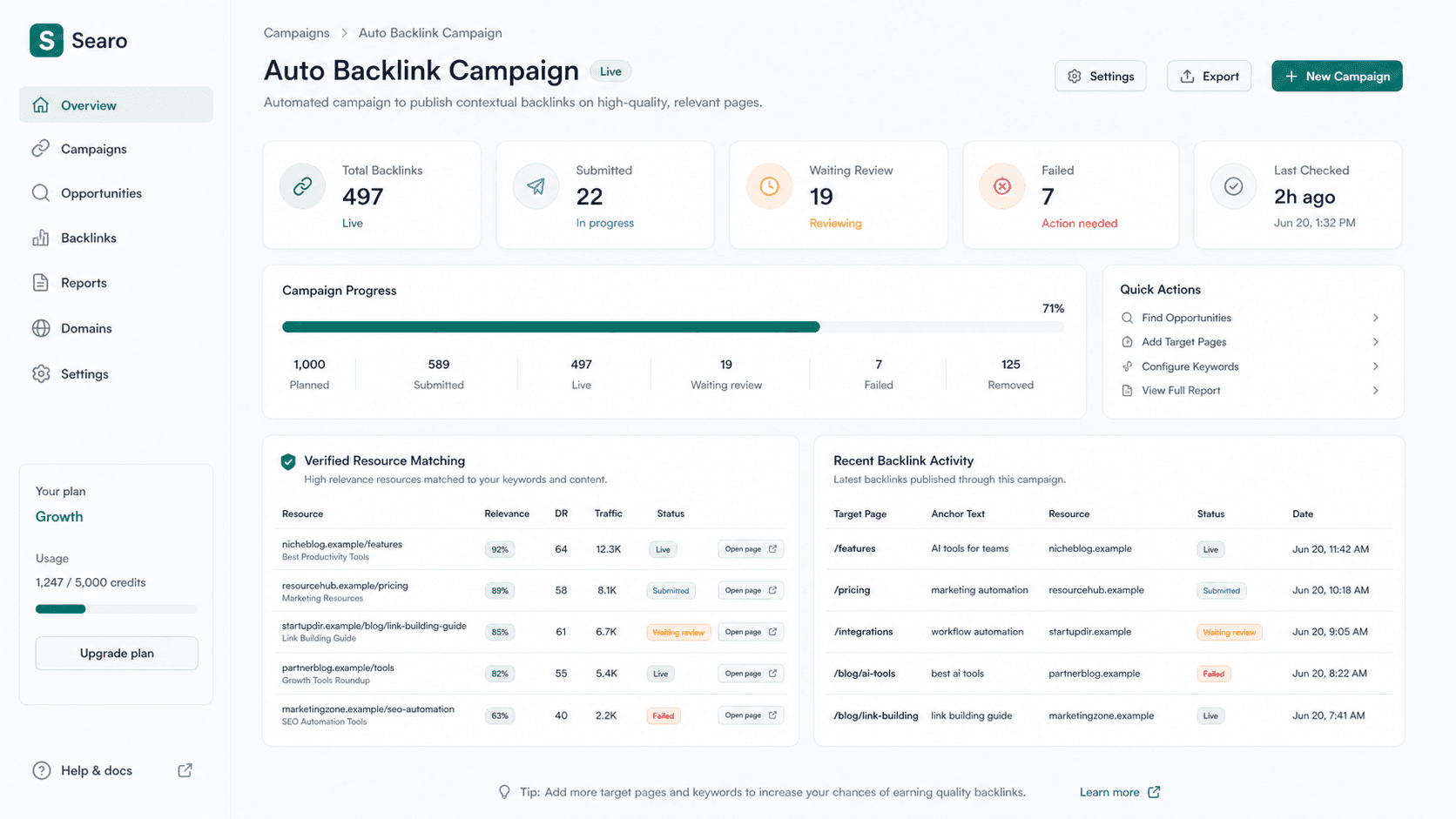
Built for measurable publishing, not spam blasts
Searo prioritizes validated sources, transparent outcomes, and live-link proof.
Verified Resources pass submit tests before campaigns use them
Resources pass submit tests before campaigns use them
Logged Every attempt can show status, response, and reason
Every attempt can show status, response, and reason
Tracked Live, waiting review, failed, and removed stay visible
Live, waiting review, failed, and removed stay visible
User Dashboard / Report
Track progress, failures, and open every live result
See planned quantity, submitted tasks, live links, waiting review, and failures — then open each published page directly.
Allocate publishing quantity across target URLs and anchor rules.
Only count published pages where the target link is detected.
Submitted tasks that are not publicly visible yet are queued for recheck.
Show captcha, login, 403, 429, API error, or missing-link reasons.
Only campaign-ready resources enter automation
Generic lists stay candidates. Resources that need login, captcha, or fail live checks are filtered out first.
Real submit testing
Check forms, submission methods, website fields, and target-page responses before a resource is used.
Live-link validation
Reopen published pages after submission and confirm that the target link is visible.
Domain success history
Track live, failed, pending, and rate-limited outcomes by domain to prioritize better sources.
Failed-domain downranking
Domains with repeated missing links, 403, 500, or unsupported submissions are deprioritized.
429 cooldown
Rate-limited domains are cooled down before additional validation or submission attempts.
Validated resources only
Campaign matching prioritizes resources marked with successful submit validation.
From project setup to verified live backlinks
One workflow for matching, generating, submitting, logging, and rechecking live links.
Create your website project
Add your website, target URLs, anchor text rules, publishing quantity, and language preference.
Match verified resources
Searo matches publishing pages from resources that pass submit tests and live-link validation.
Generate natural comments
AI prepares comments based on the target page, publishing page topic, and page language.
Verify live backlinks
Searo rechecks published pages to confirm whether the target URL is actually live.
Report and replace
Users see live, failed, waiting-review, and failure reasons so they can retry or replace sources.
Auto publishing on verified sources
Match ready resources, prepare content, submit where supported, log outcomes, and verify live links.
Campaign setup
Create a website project with target URLs, anchor rules, publishing quantity, and language preference.
Target URL management
Group target pages by keyword intent, priority, and backlink allocation.
Anchor text rules
Control exact, partial, branded, and URL anchors for each campaign.
AI-generated publishing content
Prepare AI-generated blog comments, article angles, source descriptions, and contextual copy for selected pages.
Auto-submit worker
Submit backlink tasks only through supported and pre-checked forms using campaign rules.
Failed task handling
Mark failed, manual-required, or removed links so users can retry, replace, or reallocate quantity.
Live-link verification
Check published pages and keep verified live links visible in the user dashboard.
Every attempt stays diagnosable
Request URL, form action, method, status, response snippet, and failure reason are available for review.
Request URL and action
Store the target page, detected form action, and submission method used by the worker.
HTTP status
Record response codes and redirects for each submission attempt.
Response snippet
Keep a short response sample to diagnose success messages, validation errors, or moderation notices.
Failure reason
Classify captcha, login-required, blocked, form-missing, rate-limited, API error, missing-link, and unknown outcomes.
Manual-required routing
Move complex pages to manual-required instead of promising every website can be submitted automatically.
Retry decisions
Use logs to decide whether to retry, replace the source, or verify a waiting-review backlink later.
Source discovery feeds the library, not the campaign directly
New sources must pass prefiltering, submit tests, and live-link validation before automation uses them.
Competitor backlink sources
Use competitor and niche-domain backlink data as one input for source-library expansion.
Imported backlink data
Normalize Ahrefs, Semrush, and CSV referring-page exports into candidate sources.
Deduplication
Merge repeated domains and pages before source matching.
Quality score
Rank sources by relevance, accessibility, page type, submission support, and historical success rate.
Dofollow / nofollow
Track expected and observed link attributes for each source.
Publishing status
Classify sources as usable, queued, live, waiting review, failed, removed, or manual-required.
FAQ
How automated publishing, verified resources, submit logs, and live-link reports work.
Start publishing with verified resources
Create a project, set target URLs and anchors, then let Searo match, submit, and track live backlinks.